| |
|
 |
Save Log�
|
 |
File
menu→Save Log�
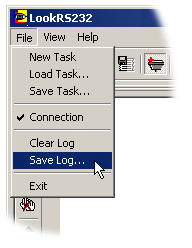 Saving LogView field,
input and output data stream as a file with a specific
name. Saving LogView field,
input and output data stream as a file with a specific
name.
Procedure:
to
save a file to a different name
-
Choose
File→Save Log �
-
Actions sequence:
-
Select or enter name of the
file in File Name field to save the da.
-
Select the type
of data to save (LogView field, input and
output data);
-
Press �Save�.
|


